 boos
e0a5f57793
boos
e0a5f57793
Vendor the rebranded BoosAPI Desktop client (Tauri + Vue) into metapi as
a monorepo subdirectory under desktop/. Source only — node_modules,
dist, Cargo target and the upstream .git history are excluded.

desktop/ keeps its own independent Cargo workspace (desktop/src-tauri
with crates/*); it is not part of the backend boosapi crate, so a
`cargo check` at the metapi root still compiles only the backend. Build
the desktop app from desktop/src-tauri per desktop/README.md.

Note: app icons are still placeholder assets pending the final BoosAPI
logo. The updater signing keys live outside the repo and are not
included.
527 lines
24 KiB
Markdown
527 lines
24 KiB
Markdown
# markstream-vue
|
||
|
||
> Fast, streaming-friendly Markdown rendering for Vue 3 — progressive Mermaid, streaming diff code blocks, and real-time previews optimized for large documents.
|
||
|
||
[](https://www.npmjs.com/package/markstream-vue)
|
||
[](README.zh-CN.md)
|
||
[](https://markstream-vue-docs.simonhe.me/)
|
||
[](https://markstream-vue.simonhe.me/)
|
||
[](https://markstream-vue.simonhe.me/test)
|
||
[](https://www.npmjs.com/package/markstream-vue)
|
||
[](https://bundlephobia.com/package/markstream-vue)
|
||
[](https://github.com/Simon-He95/markstream-vue/releases)
|
||
[](https://github.com/Simon-He95/markstream-vue/discussions)
|
||
[](https://discord.gg/vkzdkjeRCW)
|
||
[](./SUPPORT.md)
|
||
[](./SECURITY.md)
|
||
[](https://github.com/Simon-He95/markstream-vue/actions/workflows/ci.yml)
|
||
[](./license)
|
||
|
||
Looking for other frameworks?
|
||
|
||
- Vue 2.6: use [`markstream-vue2`](./packages/markstream-vue2/README.md) (a baseline port with fewer advanced features)
|
||
- React: see `packages/markstream-react` at [`packages/markstream-react/README.md`](./packages/markstream-react/README.md) (first-pass port)
|
||
|
||
## Contents
|
||
|
||
- [TL;DR Highlights](#tldr-highlights)
|
||
- [Choose Your Path](#choose-your-path)
|
||
- [Try It Now](#-try-it-now)
|
||
- [Community & support](#-community--support)
|
||
- [Quick Start](#-quick-start)
|
||
- [Common commands](#-common-commands)
|
||
- [Streaming in 30 seconds](#-streaming-in-30-seconds)
|
||
- [Performance presets](#-performance-presets)
|
||
- [Key props & options](#-key-props--options-cheatsheet)
|
||
- [Where it shines](#-where-it-shines)
|
||
- [FAQ](#-faq-quick-answers)
|
||
- [Why markstream-vue](#-why-markstream-vue-over-a-typical-markdown-renderer)
|
||
- [Roadmap](#-roadmap-snapshot)
|
||
- [Releases](#-releases)
|
||
- [Showcase](#-showcase--examples)
|
||
- [Introduction Video](#-introduction-video)
|
||
- [Features](#features)
|
||
- [Contributing & community](#-contributing--community)
|
||
- [Troubleshooting](#troubleshooting--common-issues)
|
||
- [Thanks](#thanks)
|
||
- [Star History](#star-history)
|
||
- [License](#license)
|
||
|
||
> 📖 Detailed docs, API, and advanced usage: https://markstream-vue-docs.simonhe.me/guide/
|
||
|
||
## TL;DR Highlights
|
||
|
||
- Purpose-built for **streaming Markdown** (AI/chat/SSE) with zero flicker and predictable memory.
|
||
- **Two render modes**: virtual window for long docs, incremental batching for “typing” effects.
|
||
- **Progressive diagrams** (Mermaid) and **streaming code blocks** (Monaco/Shiki) that keep up with diffs.
|
||
- Works with **raw Markdown strings or pre-parsed nodes**, supports **custom Vue components** inline.
|
||
- TypeScript-first, ship-ready defaults — import CSS and render.
|
||
|
||
## Choose Your Path
|
||
|
||
| If you want to... | Start here | Then go to |
|
||
| --- | --- | --- |
|
||
| get the first render on screen | [Quick Start](#-quick-start) | [Installation guide](https://markstream-vue-docs.simonhe.me/guide/installation) |
|
||
| integrate it into a docs site or VitePress theme | [Docs Site & VitePress](https://markstream-vue-docs.simonhe.me/guide/vitepress-docs-integration) | [Custom Tags & Advanced Components](https://markstream-vue-docs.simonhe.me/guide/custom-components) |
|
||
| build an AI chat UI or SSE stream | [AI Chat & Streaming](https://markstream-vue-docs.simonhe.me/guide/ai-chat-streaming) | [Performance](https://markstream-vue-docs.simonhe.me/guide/performance) |
|
||
| replace one built-in renderer | [Override Built-in Components](https://markstream-vue-docs.simonhe.me/guide/component-overrides) | [Renderer & Node Components](https://markstream-vue-docs.simonhe.me/guide/components) |
|
||
| add trusted tags such as `thinking` | [Custom Tags & Advanced Components](https://markstream-vue-docs.simonhe.me/guide/custom-components) | [API Reference](https://markstream-vue-docs.simonhe.me/guide/api) |
|
||
| debug a broken integration but do not know why yet | [Troubleshooting by Symptom](https://markstream-vue-docs.simonhe.me/guide/troubleshooting-path) | [Troubleshooting](https://markstream-vue-docs.simonhe.me/guide/troubleshooting) |
|
||
|
||
## 🚀 Try It Now
|
||
|
||
- Playground (interactive demo): https://markstream-vue.simonhe.me/
|
||
- Interactive test page (shareable links, easy reproduction): https://markstream-vue.simonhe.me/test
|
||
- Docs: https://markstream-vue-docs.simonhe.me/guide/
|
||
- AI/LLM context (project map): https://markstream-vue-docs.simonhe.me/llms
|
||
- AI/LLM context (中文): https://markstream-vue-docs.simonhe.me/llms.zh-CN
|
||
- One-click StackBlitz demo: https://stackblitz.com/github/Simon-He95/markstream-vue?file=playground/src/App.vue
|
||
- Changelog: [CHANGELOG.md](./CHANGELOG.md)
|
||
- Nuxt playground: `pnpm play:nuxt`
|
||
- Discord: https://discord.gg/vkzdkjeRCW
|
||
|
||
## CLI helpers for skills and prompts
|
||
|
||
If you want the packaged AI assets without cloning the repo:
|
||
|
||
```bash
|
||
npx skills add Simon-He95/markstream-vue
|
||
npx markstream-vue skills list
|
||
npx markstream-vue skills install
|
||
npx markstream-vue prompts list
|
||
npx markstream-vue prompts show install-markstream
|
||
```
|
||
|
||
Recommended usage:
|
||
|
||
- `npx skills add Simon-He95/markstream-vue` is the primary path for Codex-compatible skill discovery because it reads `.agents/skills` directly from the GitHub repository
|
||
- `skills install` installs the bundled skills into your agent skill directory (default: `~/.agents/skills`)
|
||
- `prompts list` and `prompts show` to discover and copy maintained prompt templates
|
||
|
||
Other `npx skills add` forms also work:
|
||
|
||
```bash
|
||
# Full GitHub URL
|
||
npx skills add https://github.com/Simon-He95/markstream-vue
|
||
|
||
# Direct path to one skill in this repo
|
||
npx skills add https://github.com/Simon-He95/markstream-vue/tree/main/.agents/skills/markstream-install
|
||
|
||
# Any git URL
|
||
npx skills add git@github.com:Simon-He95/markstream-vue.git
|
||
```
|
||
|
||
## 💬 Community & support
|
||
|
||
- Discussions: https://github.com/Simon-He95/markstream-vue/discussions
|
||
- Discord: https://discord.gg/vkzdkjeRCW
|
||
- Issues: please use templates and attach a repro link (https://markstream-vue.simonhe.me/test)
|
||
|
||
The test page gives you an editor + live preview plus “generate share link” that encodes the input in the URL (with a fallback to open directly or pre-fill a GitHub Issue for long payloads).
|
||
|
||
## Support the project
|
||
|
||
If markstream-vue helps your work, you can support ongoing maintenance with one of these QR codes.
|
||
|
||
| Alipay | WeChat Pay |
|
||
| --- | --- |
|
||
| <img src="https://raw.githubusercontent.com/Simon-He95/markstream-vue/main/docs/public/sponsor/zhifubao.jpg" alt="Alipay QR code" width="240" /> | <img src="https://raw.githubusercontent.com/Simon-He95/markstream-vue/main/docs/public/sponsor/weixin.jpg" alt="WeChat Pay QR code" width="240" /> |
|
||
|
||
## ⚡ Quick Start
|
||
|
||
```bash
|
||
pnpm add markstream-vue
|
||
# npm install markstream-vue
|
||
# yarn add markstream-vue
|
||
```
|
||
|
||
```ts
|
||
import MarkdownRender from 'markstream-vue'
|
||
// main.ts
|
||
import { createApp } from 'vue'
|
||
import 'markstream-vue/index.css'
|
||
|
||
createApp({
|
||
components: { MarkdownRender },
|
||
template: '<MarkdownRender custom-id="docs" :content="doc" />',
|
||
setup() {
|
||
const doc = '# Hello from markstream-vue\\n\\nSupports **streaming** nodes.'
|
||
return { doc }
|
||
},
|
||
}).mount('#app')
|
||
```
|
||
|
||
Import `markstream-vue/index.css` after your reset (e.g., Tailwind `@layer components`) so renderer styles win over utility classes. Install optional peers such as `stream-monaco`, `shiki`, `stream-markdown`, `mermaid`, and `katex` only when you need Monaco code blocks, Shiki highlighting, diagrams, or math.
|
||
If your app intentionally scales root font size on mobile, use `markstream-vue/index.px.css` to avoid `rem`-based global scaling side effects.
|
||
|
||
Renderer CSS is scoped under an internal `.markstream-vue` container to minimize global style conflicts. If you render exported node components outside of `MarkdownRender`, wrap them in an element with class `markstream-vue`.
|
||
|
||
For dark theme variables, either add a `.dark` class on an ancestor, or pass `:is-dark="true"` to `MarkdownRender` to scope dark mode to the renderer.
|
||
|
||
Prefer the unified code-block `theme` prop for new integrations. When you render through `MarkdownRender`, pass it via `code-block-props`:
|
||
|
||
```vue
|
||
<MarkdownRender
|
||
:is-dark="isDark"
|
||
:code-block-props="{ theme: { light: 'vitesse-light', dark: 'vitesse-dark' } }"
|
||
:content="doc"
|
||
/>
|
||
```
|
||
|
||
Language icons use the built-in `material` theme by default. Advanced integrations can inspect or switch icon themes with the exported helpers, or set an initial theme with `app.use(VueRendererMarkdown, { iconTheme })`:
|
||
|
||
```ts
|
||
import { getRegisteredThemes, setIconTheme } from 'markstream-vue'
|
||
|
||
console.log(getRegisteredThemes()) // ['material']
|
||
setIconTheme('material')
|
||
```
|
||
|
||
Use `registerIconTheme()` if you want to add your own icon pack.
|
||
|
||
Enable heavy peers only when needed:
|
||
|
||
```ts
|
||
import { enableKatex, enableMermaid } from 'markstream-vue'
|
||
import 'markstream-vue/index.css'
|
||
import 'katex/dist/katex.min.css'
|
||
|
||
// after you install `mermaid` / `katex` peers
|
||
enableMermaid()
|
||
enableKatex()
|
||
```
|
||
|
||
<details>
|
||
<summary>Optional: CDN-backed workers (KaTeX / Mermaid)</summary>
|
||
|
||
If you load KaTeX via CDN and want KaTeX rendering in a Web Worker (no bundler / optional peer not installed), inject a CDN-backed worker:
|
||
|
||
```ts
|
||
import { createKaTeXWorkerFromCDN, setKaTeXWorker } from 'markstream-vue'
|
||
|
||
const { worker } = createKaTeXWorkerFromCDN({
|
||
mode: 'classic',
|
||
// UMD builds used by importScripts() inside the worker
|
||
katexUrl: 'https://cdn.jsdelivr.net/npm/katex@0.16.22/dist/katex.min.js',
|
||
mhchemUrl: 'https://cdn.jsdelivr.net/npm/katex@0.16.22/dist/contrib/mhchem.min.js',
|
||
})
|
||
|
||
if (worker)
|
||
setKaTeXWorker(worker)
|
||
```
|
||
|
||
If you load Mermaid via CDN and want off-main-thread parsing (used by progressive Mermaid rendering), inject a Mermaid parser worker:
|
||
|
||
```ts
|
||
import { createMermaidWorkerFromCDN, setMermaidWorker } from 'markstream-vue'
|
||
|
||
const { worker } = createMermaidWorkerFromCDN({
|
||
// Mermaid CDN builds are commonly ESM; module worker is recommended.
|
||
mode: 'module',
|
||
workerOptions: { type: 'module' },
|
||
mermaidUrl: 'https://cdn.jsdelivr.net/npm/mermaid@11/dist/mermaid.esm.min.mjs',
|
||
})
|
||
|
||
if (worker)
|
||
setMermaidWorker(worker)
|
||
```
|
||
|
||
</details>
|
||
|
||
<details>
|
||
<summary>Nuxt quick drop-in</summary>
|
||
|
||
```ts
|
||
// plugins/markstream-vue.client.ts
|
||
import { defineNuxtPlugin } from '#app'
|
||
import MarkdownRender from 'markstream-vue'
|
||
import 'markstream-vue/index.css'
|
||
|
||
export default defineNuxtPlugin((nuxtApp) => {
|
||
nuxtApp.vueApp.component('MarkdownRender', MarkdownRender)
|
||
})
|
||
```
|
||
|
||
Then use `<MarkdownRender :content="md" />` in your pages.
|
||
|
||
</details>
|
||
|
||
## 🛠️ Common commands
|
||
|
||
- `pnpm dev` — playground dev server
|
||
- `pnpm play:nuxt` — Nuxt playground dev
|
||
- `pnpm build` — library + CSS build
|
||
- `pnpm build:analyze` — build with bundle visualizer reports (`bundle-visualizer.html`, `bundle-visualizer-tailwind.html`)
|
||
- `pnpm size:check` — run dist + npm package size budget checks (same guard used in CI)
|
||
- `pnpm test` — Vitest suite (`pnpm test:update` for snapshots)
|
||
- `pnpm typecheck` / `pnpm lint` — type and lint checks
|
||
|
||
## ⏱️ Streaming in 30 seconds
|
||
|
||
Render streamed Markdown (SSE/websocket) with incremental updates:
|
||
|
||
```ts
|
||
import type { ParsedNode } from 'markstream-vue'
|
||
import MarkdownRender, { getMarkdown, parseMarkdownToStructure } from 'markstream-vue'
|
||
import { ref } from 'vue'
|
||
|
||
const nodes = ref<ParsedNode[]>([])
|
||
const buffer = ref('')
|
||
const md = getMarkdown()
|
||
|
||
function addChunk(chunk: string) {
|
||
buffer.value += chunk
|
||
nodes.value = parseMarkdownToStructure(buffer.value, md)
|
||
}
|
||
|
||
// e.g., inside your SSE/onmessage handler
|
||
eventSource.onmessage = event => addChunk(event.data)
|
||
|
||
// template
|
||
// <MarkdownRender
|
||
// :nodes="nodes"
|
||
// :max-live-nodes="0"
|
||
// :batch-rendering="{
|
||
// renderBatchSize: 16,
|
||
// renderBatchDelay: 8,
|
||
// }"
|
||
// />
|
||
```
|
||
|
||
Switch rendering style per surface:
|
||
|
||
- Virtualized window (default): steady scrolling and memory usage for long docs.
|
||
- Incremental batches: set `:max-live-nodes="0"` for AI-like “typing” with lightweight placeholders.
|
||
|
||
<details>
|
||
<summary>Advanced: SSR / worker / streaming handoff</summary>
|
||
|
||
### SSR / Worker usage (deterministic output)
|
||
|
||
Pre-parse Markdown on the server or in a worker and render typed nodes on the client:
|
||
|
||
```ts
|
||
// server or worker
|
||
import { getMarkdown, parseMarkdownToStructure } from 'markstream-vue'
|
||
|
||
const md = getMarkdown()
|
||
const nodes = parseMarkdownToStructure('# Hello\n\nThis is parsed once', md)
|
||
// send `nodes` JSON to the client
|
||
```
|
||
|
||
```vue
|
||
<!-- client -->
|
||
<MarkdownRender :nodes="nodesFromServer" />
|
||
```
|
||
|
||
This avoids client-side parsing and keeps SSR/hydration deterministic.
|
||
|
||
### Hybrid: SSR + streaming handoff
|
||
|
||
- Server: parse the first Markdown batch to nodes and serialize `initialNodes` (and the raw `initialMarkdown` if you also stream later chunks).
|
||
- Client: hydrate with the same parser options, then keep streaming:
|
||
|
||
```ts
|
||
import type { ParsedNode } from 'markstream-vue'
|
||
import { getMarkdown, parseMarkdownToStructure } from 'markstream-vue'
|
||
import { ref } from 'vue'
|
||
|
||
const nodes = ref<ParsedNode[]>(initialNodes)
|
||
const buffer = ref(initialMarkdown)
|
||
const md = getMarkdown() // match server setup
|
||
|
||
function addChunk(chunk: string) {
|
||
buffer.value += chunk
|
||
nodes.value = parseMarkdownToStructure(buffer.value, md)
|
||
}
|
||
```
|
||
|
||
This avoids re-parsing SSR content while letting later SSE/WebSocket chunks continue the stream.
|
||
|
||
> Tip: when you know the stream has ended (the message is complete), use `parseMarkdownToStructure(buffer.value, md, { final: true })` or pass `:final="true"` to the component. This disables mid-state (`loading`) parsing so trailing delimiters (like `$$` or an unclosed code fence) won’t get stuck showing perpetual loading.
|
||
|
||
</details>
|
||
|
||
## ⚙️ Performance presets
|
||
|
||
- **Virtual window (default)** – keep `max-live-nodes` at its default `320` to enable virtualization. Nodes render immediately and the renderer keeps a sliding window of elements mounted so long docs remain responsive without showing skeleton placeholders.
|
||
- **Incremental stream** – set `:max-live-nodes="0"` when you want a true typewriter effect. This disables virtualization and turns on incremental batching governed by `batchRendering`, `initialRenderBatchSize`, `renderBatchSize`, `renderBatchDelay`, and `renderBatchBudgetMs`, so new content flows in small slices with lightweight placeholders.
|
||
|
||
Pick one mode per surface: virtualization for best scrollback and steady memory usage, or incremental batching for AI-style “typing” previews.
|
||
|
||
> Tip: In chats, combine `max-live-nodes="0"` with small `renderBatchSize` (e.g., `16`) and a tiny `renderBatchDelay` (e.g., `8ms`) to keep the “typing” feel smooth without jumping large chunks. Tune `renderBatchBudgetMs` down if you need to cap CPU per frame.
|
||
|
||
## 🧰 Key props & options (cheatsheet)
|
||
|
||
- `content` vs `nodes`: pass raw Markdown or pre-parsed nodes (from `parseMarkdownToStructure`).
|
||
- `max-live-nodes`: `320` (default virtualization) or `0` (incremental batches).
|
||
- `batchRendering`: fine-tune batches with `initialRenderBatchSize`, `renderBatchSize`, `renderBatchDelay`, `renderBatchBudgetMs`.
|
||
- `enableMermaid` / `enableKatex`: (re)enable heavy peers or custom loaders when needed (pairs with `disableMermaid` / `disableKatex`).
|
||
- `parse-options`: reuse parser hooks (e.g., `preTransformTokens`, `requireClosingStrong`) on the component.
|
||
- `final`: marks end-of-stream; disables mid-state loading parsing and forces unfinished constructs to settle.
|
||
- `custom-html-tags`: extend streaming HTML allowlist for custom tags and emit them as custom nodes for `setCustomComponents` (e.g., `['thinking']`).
|
||
- `setCustomComponents(customId?, mapping)`: register inline Vue components for custom tags/markers (scoped by `custom-id` when provided).
|
||
|
||
Example: map Markdown placeholders to Vue components (scoped)
|
||
|
||
```ts
|
||
import { setCustomComponents } from 'markstream-vue'
|
||
|
||
setCustomComponents('docs', {
|
||
CALLOUT: () => import('./components/Callout.vue'),
|
||
})
|
||
|
||
// Markdown: [[CALLOUT:warning title="Heads up" body="Details here"]]
|
||
```
|
||
|
||
Use the same `custom-id` on the renderer:
|
||
|
||
```vue
|
||
<MarkdownRender
|
||
:content="doc"
|
||
custom-id="docs"
|
||
/>
|
||
```
|
||
|
||
Parse hooks example (match server + client):
|
||
|
||
```vue
|
||
<MarkdownRender
|
||
:content="doc"
|
||
:parse-options="{
|
||
requireClosingStrong: true,
|
||
preTransformTokens: (tokens) => tokens,
|
||
}"
|
||
/>
|
||
```
|
||
|
||
## 🔥 Where it shines
|
||
|
||
- AI/chat UIs with long-form answers and Markdown tokens arriving over SSE/websocket.
|
||
- Docs, changelogs, and knowledge bases that need instant load but stay responsive as they grow.
|
||
- Streaming diffs and code review panes that benefit from Monaco live updates.
|
||
- Diagram-heavy content that should render progressively (Mermaid) without blocking.
|
||
- Embedding Vue components in Markdown-driven surfaces (callouts, widgets, CTA buttons).
|
||
|
||
## ❓ FAQ (quick answers)
|
||
|
||
- Mermaid/KaTeX not rendering? Install the peer (`mermaid` / `katex`) and pass `:enable-mermaid="true"` / `:enable-katex="true"` or call the loader setters. If you load them via CDN script tags, the library will also pick up `window.mermaid` / `window.katex`.
|
||
- CDN + KaTeX worker: if you don't bundle `katex` but still want off-main-thread rendering, create and inject a worker that loads KaTeX via CDN (UMD) using `createKaTeXWorkerFromCDN()` + `setKaTeXWorker()`.
|
||
- Bundle size: peers are optional and not bundled; import only `markstream-vue/index.css` once; use Shiki (`MarkdownCodeBlockNode`) when Monaco is too heavy. Infrequent language icons are split into an async chunk and load on demand; call `preloadExtendedLanguageIcons()` during app idle if you want to avoid first-hit icon fallback.
|
||
- Custom UI: register components via `setCustomComponents` (global or scoped), then emit markers/placeholders in Markdown and map them to Vue components.
|
||
|
||
## 🆚 Why markstream-vue over a typical Markdown renderer?
|
||
|
||
| Needs | Typical Markdown preview | markstream-vue |
|
||
| --- | --- | --- |
|
||
| Streaming input | Re-renders whole tree, flashes | Incremental batches with virtual windowing |
|
||
| Large code blocks | Slow re-highlight | Monaco streaming updates + Shiki option |
|
||
| Diagrams | Blocks while parsing | Progressive Mermaid with graceful fallback |
|
||
| Custom UI | Limited slots | Inline Vue components & typed nodes |
|
||
| Long docs | Memory spikes | Configurable live-node cap for steady usage |
|
||
|
||
## 🗺️ Roadmap (snapshot)
|
||
|
||
- More “instant start” templates (Vite + Nuxt + Tailwind) and updated StackBlitz.
|
||
- Additional codeblock presets (diff-friendly Shiki themes, Monaco decoration helpers).
|
||
- Cookbook docs for AI/chat patterns (SSE/WebSocket, retry/resume, markdown mid-states).
|
||
- More showcase examples for embedding Vue components inside Markdown surfaces.
|
||
|
||
## 📦 Releases
|
||
|
||
- Latest: [Releases](https://github.com/Simon-He95/markstream-vue/releases) — see highlights and upgrade notes.
|
||
- Full history: [CHANGELOG.md](./CHANGELOG.md)
|
||
- Recent highlights (0.0.3-beta.1/beta.0):
|
||
- Parser bumped to `stream-markdown-parser@0.0.36` for parsing fixes.
|
||
- Monaco upgrades with more languages/themes + diff-friendly code block tweaks.
|
||
- HTML/SVG preview dialog and AST debug view in the playground.
|
||
|
||
## 🧭 Showcase & examples
|
||
|
||
Build something with markstream-vue? Open a PR to add it here (include a link + 1 screenshot/GIF). Ideal fits: AI/chat UIs, streaming docs, diff/code-review panes, or Markdown-driven pages with embedded Vue components.
|
||
|
||
- **FlowNote** — streaming Markdown note app demo (SSE + virtual window) — https://markstream-vue.simonhe.me/
|
||
- **AI Chat surface** — playground “test” page showing incremental batches + share links — https://markstream-vue.simonhe.me/test
|
||
|
||
## 📺 Introduction Video
|
||
|
||
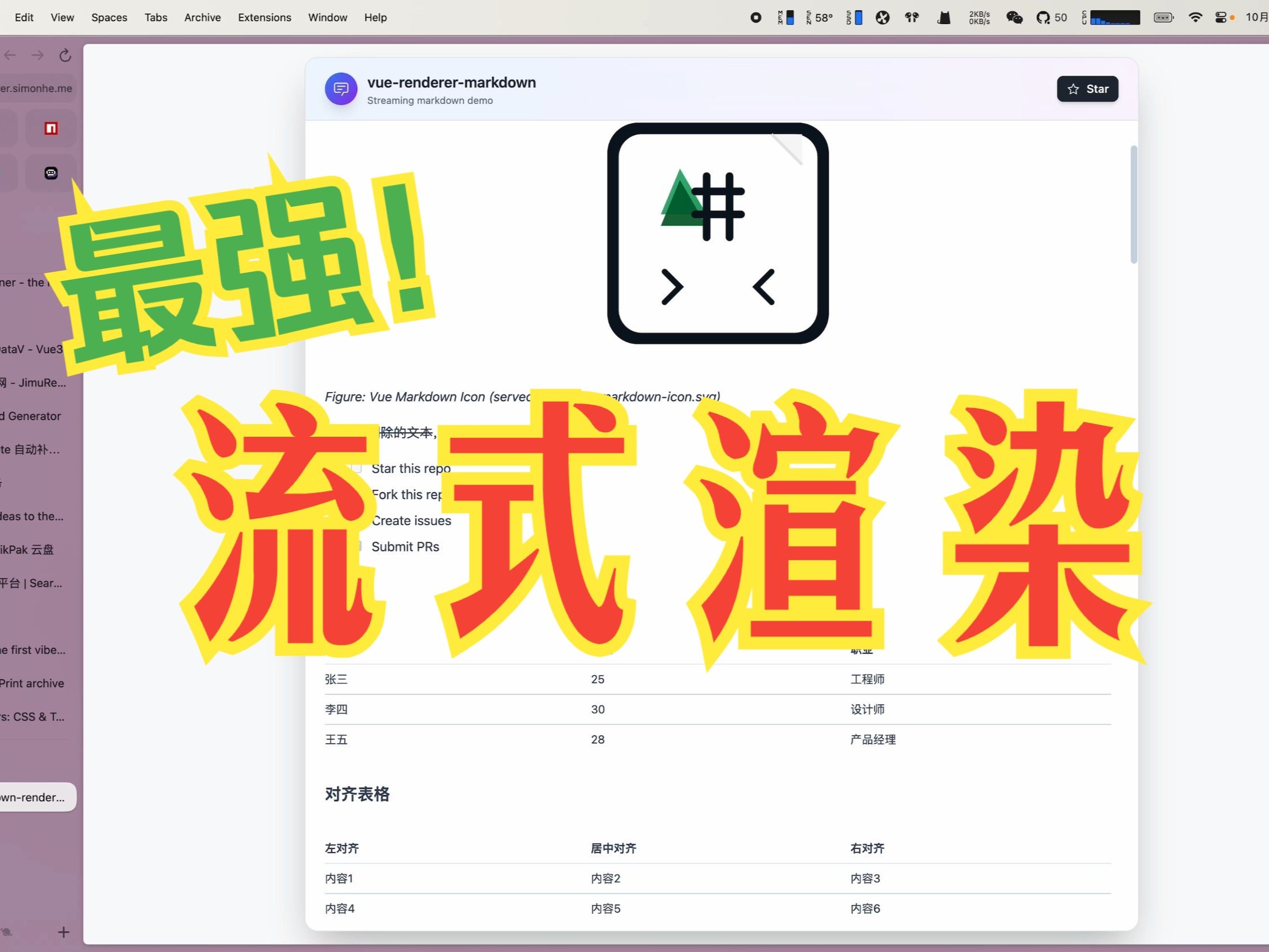
A short video introduces the key features and usage of markstream-vue:
|
||
|
||
[](https://www.bilibili.com/video/BV17Z4qzpE9c/)
|
||
|
||
Watch on Bilibili: [Open in Bilibili](https://www.bilibili.com/video/BV17Z4qzpE9c/)
|
||
|
||
## Features
|
||
|
||
- ⚡ Extreme performance: minimal re-rendering and efficient DOM updates for streaming scenarios
|
||
- 🌊 Streaming-first: native support for incomplete or frequently updated tokenized Markdown
|
||
- 🧠 Monaco streaming updates: high-performance Monaco integration for smooth incremental updates of large code blocks
|
||
- 🪄 Progressive Mermaid: charts render instantly when syntax is available, and improve with later updates
|
||
- 🧩 Custom components: embed custom Vue components in Markdown content
|
||
- 📝 Full Markdown support: tables, formulas, emoji, checkboxes, code blocks, etc.
|
||
- 🔄 Real-time updates: supports incremental content without breaking formatting
|
||
- 📦 TypeScript-first: complete type definitions and IntelliSense
|
||
- 🔌 Zero config: works out of the box in Vue 3 projects
|
||
- 🎨 Flexible code block rendering: choose Monaco editor (`CodeBlockNode`) or lightweight Shiki highlighting (`MarkdownCodeBlockNode`)
|
||
- 🧰 Parser toolkit: [`stream-markdown-parser`](./packages/markdown-parser) now documents how to reuse the parser in workers/SSE streams and feed `<MarkdownRender :nodes>` directly, plus APIs for registering global plugins and custom math helpers.
|
||
|
||
## 🙌 Contributing & community
|
||
|
||
- Read the contributor guide: [CONTRIBUTING.md](./CONTRIBUTING.md) and follow the PR template.
|
||
- Be kind and follow the [Code of Conduct](./CODE_OF_CONDUCT.md).
|
||
- Issues: use templates for bugs/requests; attach a repro from https://markstream-vue.simonhe.me/test when possible.
|
||
- Questions? Start a discussion: https://github.com/Simon-He95/markstream-vue/discussions
|
||
- Chat live: Discord https://discord.gg/vkzdkjeRCW
|
||
- Looking to contribute? Start with [good first issues](https://github.com/Simon-He95/markstream-vue/labels/good%20first%20issue).
|
||
- Support guide: [SUPPORT.md](./SUPPORT.md)
|
||
- PRs: follow Conventional Commits, add tests for parser/render changes, and include screenshots/GIFs for UI tweaks.
|
||
- If the project helps you, consider starring and sharing the repo — it keeps the work sustainable.
|
||
- Security: see [SECURITY.md](./SECURITY.md) to report vulnerabilities privately.
|
||
|
||
### Quick ways to help
|
||
|
||
- Add repro links/screenshots to existing issues.
|
||
- Improve docs/examples (especially streaming + SSR/worker patterns).
|
||
- Share playground/test links that showcase performance edge cases.
|
||
|
||
## Troubleshooting & Common Issues
|
||
|
||
Troubleshooting has moved into the docs:
|
||
https://markstream-vue-docs.simonhe.me/guide/troubleshooting
|
||
|
||
If you can't find a solution there, open a GitHub issue:
|
||
https://github.com/Simon-He95/markstream-vue/issues
|
||
|
||
### Report an issue quickly
|
||
|
||
1. Reproduce in the test page and click “generate share link”: https://markstream-vue.simonhe.me/test
|
||
2. Open a bug report with the link and a screenshot: https://github.com/Simon-He95/markstream-vue/issues/new?template=bug_report.yml
|
||
|
||
## Thanks
|
||
|
||
### Contributors
|
||
|
||
Thanks to all the people who have contributed to this project!
|
||
|
||
[](https://github.com/Simon-He95/markstream-vue/graphs/contributors)
|
||
|
||
### Dependencies
|
||
|
||
This project uses and benefits from:
|
||
- [stream-monaco](https://github.com/Simon-He95/stream-monaco)
|
||
- [stream-markdown](https://github.com/Simon-He95/stream-markdown)
|
||
- [mermaid](https://mermaid-js.github.io/mermaid)
|
||
- [katex](https://katex.org/)
|
||
- [shiki](https://github.com/shikijs/shiki)
|
||
- [markdown-it-ts](https://github.com/Simon-He95/markdown-it-ts)
|
||
|
||
Thanks to the authors and contributors of these projects!
|
||
|
||
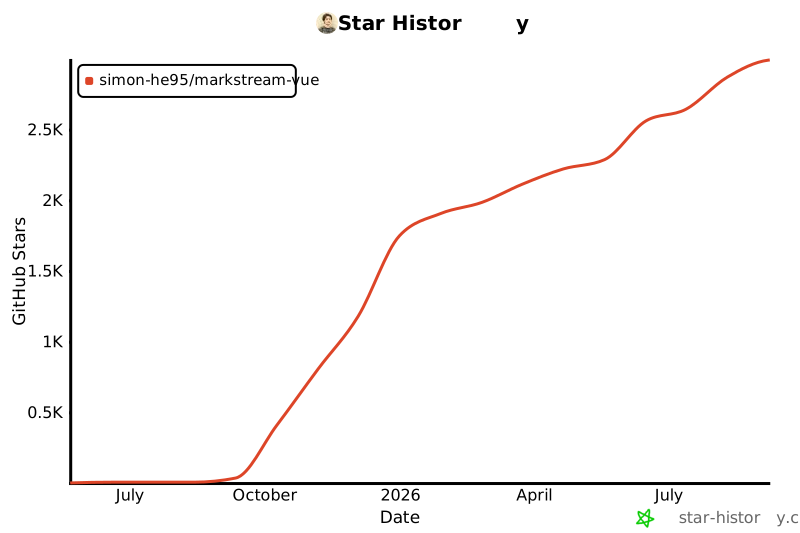
## Star History
|
||
|
||
[](https://www.star-history.com/#Simon-He95/markstream-vue&Date)
|
||
|
||
## License
|
||
|
||
[MIT](./license) © [Simon He](https://github.com/Simon-He95)
|