# markstream-vue
> Fast, streaming-friendly Markdown rendering for Vue 3 — progressive Mermaid, streaming diff code blocks, and real-time previews optimized for large documents.
[](https://www.npmjs.com/package/markstream-vue)
[](README.zh-CN.md)
[](https://markstream-vue-docs.simonhe.me/)
[](https://markstream-vue.simonhe.me/)
[](https://markstream-vue.simonhe.me/test)
[](https://www.npmjs.com/package/markstream-vue)
[](https://bundlephobia.com/package/markstream-vue)
[](https://github.com/Simon-He95/markstream-vue/releases)
[](https://github.com/Simon-He95/markstream-vue/discussions)
[](https://discord.gg/vkzdkjeRCW)
[](./SUPPORT.md)
[](./SECURITY.md)
[](https://github.com/Simon-He95/markstream-vue/actions/workflows/ci.yml)
[](./license)
Looking for other frameworks?
- Vue 2.6: use [`markstream-vue2`](./packages/markstream-vue2/README.md) (a baseline port with fewer advanced features)
- React: see `packages/markstream-react` at [`packages/markstream-react/README.md`](./packages/markstream-react/README.md) (first-pass port)
## Contents
- [TL;DR Highlights](#tldr-highlights)
- [Choose Your Path](#choose-your-path)
- [Try It Now](#-try-it-now)
- [Community & support](#-community--support)
- [Quick Start](#-quick-start)
- [Common commands](#-common-commands)
- [Streaming in 30 seconds](#-streaming-in-30-seconds)
- [Performance presets](#-performance-presets)
- [Key props & options](#-key-props--options-cheatsheet)
- [Where it shines](#-where-it-shines)
- [FAQ](#-faq-quick-answers)
- [Why markstream-vue](#-why-markstream-vue-over-a-typical-markdown-renderer)
- [Roadmap](#-roadmap-snapshot)
- [Releases](#-releases)
- [Showcase](#-showcase--examples)
- [Introduction Video](#-introduction-video)
- [Features](#features)
- [Contributing & community](#-contributing--community)
- [Troubleshooting](#troubleshooting--common-issues)
- [Thanks](#thanks)
- [Star History](#star-history)
- [License](#license)
> 📖 Detailed docs, API, and advanced usage: https://markstream-vue-docs.simonhe.me/guide/
## TL;DR Highlights
- Purpose-built for **streaming Markdown** (AI/chat/SSE) with zero flicker and predictable memory.
- **Two render modes**: virtual window for long docs, incremental batching for “typing” effects.
- **Progressive diagrams** (Mermaid) and **streaming code blocks** (Monaco/Shiki) that keep up with diffs.
- Works with **raw Markdown strings or pre-parsed nodes**, supports **custom Vue components** inline.
- TypeScript-first, ship-ready defaults — import CSS and render.
## Choose Your Path
| If you want to... | Start here | Then go to |
| --- | --- | --- |
| get the first render on screen | [Quick Start](#-quick-start) | [Installation guide](https://markstream-vue-docs.simonhe.me/guide/installation) |
| integrate it into a docs site or VitePress theme | [Docs Site & VitePress](https://markstream-vue-docs.simonhe.me/guide/vitepress-docs-integration) | [Custom Tags & Advanced Components](https://markstream-vue-docs.simonhe.me/guide/custom-components) |
| build an AI chat UI or SSE stream | [AI Chat & Streaming](https://markstream-vue-docs.simonhe.me/guide/ai-chat-streaming) | [Performance](https://markstream-vue-docs.simonhe.me/guide/performance) |
| replace one built-in renderer | [Override Built-in Components](https://markstream-vue-docs.simonhe.me/guide/component-overrides) | [Renderer & Node Components](https://markstream-vue-docs.simonhe.me/guide/components) |
| add trusted tags such as `thinking` | [Custom Tags & Advanced Components](https://markstream-vue-docs.simonhe.me/guide/custom-components) | [API Reference](https://markstream-vue-docs.simonhe.me/guide/api) |
| debug a broken integration but do not know why yet | [Troubleshooting by Symptom](https://markstream-vue-docs.simonhe.me/guide/troubleshooting-path) | [Troubleshooting](https://markstream-vue-docs.simonhe.me/guide/troubleshooting) |
## 🚀 Try It Now
- Playground (interactive demo): https://markstream-vue.simonhe.me/
- Interactive test page (shareable links, easy reproduction): https://markstream-vue.simonhe.me/test
- Docs: https://markstream-vue-docs.simonhe.me/guide/
- AI/LLM context (project map): https://markstream-vue-docs.simonhe.me/llms
- AI/LLM context (中文): https://markstream-vue-docs.simonhe.me/llms.zh-CN
- One-click StackBlitz demo: https://stackblitz.com/github/Simon-He95/markstream-vue?file=playground/src/App.vue
- Changelog: [CHANGELOG.md](./CHANGELOG.md)
- Nuxt playground: `pnpm play:nuxt`
- Discord: https://discord.gg/vkzdkjeRCW
## CLI helpers for skills and prompts
If you want the packaged AI assets without cloning the repo:
```bash
npx skills add Simon-He95/markstream-vue
npx markstream-vue skills list
npx markstream-vue skills install
npx markstream-vue prompts list
npx markstream-vue prompts show install-markstream
```
Recommended usage:
- `npx skills add Simon-He95/markstream-vue` is the primary path for Codex-compatible skill discovery because it reads `.agents/skills` directly from the GitHub repository
- `skills install` installs the bundled skills into your agent skill directory (default: `~/.agents/skills`)
- `prompts list` and `prompts show` to discover and copy maintained prompt templates
Other `npx skills add` forms also work:
```bash
# Full GitHub URL
npx skills add https://github.com/Simon-He95/markstream-vue
# Direct path to one skill in this repo
npx skills add https://github.com/Simon-He95/markstream-vue/tree/main/.agents/skills/markstream-install
# Any git URL
npx skills add git@github.com:Simon-He95/markstream-vue.git
```
## 💬 Community & support
- Discussions: https://github.com/Simon-He95/markstream-vue/discussions
- Discord: https://discord.gg/vkzdkjeRCW
- Issues: please use templates and attach a repro link (https://markstream-vue.simonhe.me/test)
The test page gives you an editor + live preview plus “generate share link” that encodes the input in the URL (with a fallback to open directly or pre-fill a GitHub Issue for long payloads).
## Support the project
If markstream-vue helps your work, you can support ongoing maintenance with one of these QR codes.
| Alipay | WeChat Pay |
| --- | --- |
|  |
|  |
## ⚡ Quick Start
```bash
pnpm add markstream-vue
# npm install markstream-vue
# yarn add markstream-vue
```
```ts
import MarkdownRender from 'markstream-vue'
// main.ts
import { createApp } from 'vue'
import 'markstream-vue/index.css'
createApp({
components: { MarkdownRender },
template: '',
setup() {
const doc = '# Hello from markstream-vue\\n\\nSupports **streaming** nodes.'
return { doc }
},
}).mount('#app')
```
Import `markstream-vue/index.css` after your reset (e.g., Tailwind `@layer components`) so renderer styles win over utility classes. Install optional peers such as `stream-monaco`, `shiki`, `stream-markdown`, `mermaid`, and `katex` only when you need Monaco code blocks, Shiki highlighting, diagrams, or math.
If your app intentionally scales root font size on mobile, use `markstream-vue/index.px.css` to avoid `rem`-based global scaling side effects.
Renderer CSS is scoped under an internal `.markstream-vue` container to minimize global style conflicts. If you render exported node components outside of `MarkdownRender`, wrap them in an element with class `markstream-vue`.
For dark theme variables, either add a `.dark` class on an ancestor, or pass `:is-dark="true"` to `MarkdownRender` to scope dark mode to the renderer.
Prefer the unified code-block `theme` prop for new integrations. When you render through `MarkdownRender`, pass it via `code-block-props`:
```vue
```
Language icons use the built-in `material` theme by default. Advanced integrations can inspect or switch icon themes with the exported helpers, or set an initial theme with `app.use(VueRendererMarkdown, { iconTheme })`:
```ts
import { getRegisteredThemes, setIconTheme } from 'markstream-vue'
console.log(getRegisteredThemes()) // ['material']
setIconTheme('material')
```
Use `registerIconTheme()` if you want to add your own icon pack.
Enable heavy peers only when needed:
```ts
import { enableKatex, enableMermaid } from 'markstream-vue'
import 'markstream-vue/index.css'
import 'katex/dist/katex.min.css'
// after you install `mermaid` / `katex` peers
enableMermaid()
enableKatex()
```
|
## ⚡ Quick Start
```bash
pnpm add markstream-vue
# npm install markstream-vue
# yarn add markstream-vue
```
```ts
import MarkdownRender from 'markstream-vue'
// main.ts
import { createApp } from 'vue'
import 'markstream-vue/index.css'
createApp({
components: { MarkdownRender },
template: '',
setup() {
const doc = '# Hello from markstream-vue\\n\\nSupports **streaming** nodes.'
return { doc }
},
}).mount('#app')
```
Import `markstream-vue/index.css` after your reset (e.g., Tailwind `@layer components`) so renderer styles win over utility classes. Install optional peers such as `stream-monaco`, `shiki`, `stream-markdown`, `mermaid`, and `katex` only when you need Monaco code blocks, Shiki highlighting, diagrams, or math.
If your app intentionally scales root font size on mobile, use `markstream-vue/index.px.css` to avoid `rem`-based global scaling side effects.
Renderer CSS is scoped under an internal `.markstream-vue` container to minimize global style conflicts. If you render exported node components outside of `MarkdownRender`, wrap them in an element with class `markstream-vue`.
For dark theme variables, either add a `.dark` class on an ancestor, or pass `:is-dark="true"` to `MarkdownRender` to scope dark mode to the renderer.
Prefer the unified code-block `theme` prop for new integrations. When you render through `MarkdownRender`, pass it via `code-block-props`:
```vue
```
Language icons use the built-in `material` theme by default. Advanced integrations can inspect or switch icon themes with the exported helpers, or set an initial theme with `app.use(VueRendererMarkdown, { iconTheme })`:
```ts
import { getRegisteredThemes, setIconTheme } from 'markstream-vue'
console.log(getRegisteredThemes()) // ['material']
setIconTheme('material')
```
Use `registerIconTheme()` if you want to add your own icon pack.
Enable heavy peers only when needed:
```ts
import { enableKatex, enableMermaid } from 'markstream-vue'
import 'markstream-vue/index.css'
import 'katex/dist/katex.min.css'
// after you install `mermaid` / `katex` peers
enableMermaid()
enableKatex()
```
Optional: CDN-backed workers (KaTeX / Mermaid)
If you load KaTeX via CDN and want KaTeX rendering in a Web Worker (no bundler / optional peer not installed), inject a CDN-backed worker:
```ts
import { createKaTeXWorkerFromCDN, setKaTeXWorker } from 'markstream-vue'
const { worker } = createKaTeXWorkerFromCDN({
mode: 'classic',
// UMD builds used by importScripts() inside the worker
katexUrl: 'https://cdn.jsdelivr.net/npm/katex@0.16.22/dist/katex.min.js',
mhchemUrl: 'https://cdn.jsdelivr.net/npm/katex@0.16.22/dist/contrib/mhchem.min.js',
})
if (worker)
setKaTeXWorker(worker)
```
If you load Mermaid via CDN and want off-main-thread parsing (used by progressive Mermaid rendering), inject a Mermaid parser worker:
```ts
import { createMermaidWorkerFromCDN, setMermaidWorker } from 'markstream-vue'
const { worker } = createMermaidWorkerFromCDN({
// Mermaid CDN builds are commonly ESM; module worker is recommended.
mode: 'module',
workerOptions: { type: 'module' },
mermaidUrl: 'https://cdn.jsdelivr.net/npm/mermaid@11/dist/mermaid.esm.min.mjs',
})
if (worker)
setMermaidWorker(worker)
```
Nuxt quick drop-in
```ts
// plugins/markstream-vue.client.ts
import { defineNuxtPlugin } from '#app'
import MarkdownRender from 'markstream-vue'
import 'markstream-vue/index.css'
export default defineNuxtPlugin((nuxtApp) => {
nuxtApp.vueApp.component('MarkdownRender', MarkdownRender)
})
```
Then use `` in your pages.
## 🛠️ Common commands
- `pnpm dev` — playground dev server
- `pnpm play:nuxt` — Nuxt playground dev
- `pnpm build` — library + CSS build
- `pnpm build:analyze` — build with bundle visualizer reports (`bundle-visualizer.html`, `bundle-visualizer-tailwind.html`)
- `pnpm size:check` — run dist + npm package size budget checks (same guard used in CI)
- `pnpm test` — Vitest suite (`pnpm test:update` for snapshots)
- `pnpm typecheck` / `pnpm lint` — type and lint checks
## ⏱️ Streaming in 30 seconds
Render streamed Markdown (SSE/websocket) with incremental updates:
```ts
import type { ParsedNode } from 'markstream-vue'
import MarkdownRender, { getMarkdown, parseMarkdownToStructure } from 'markstream-vue'
import { ref } from 'vue'
const nodes = ref([])
const buffer = ref('')
const md = getMarkdown()
function addChunk(chunk: string) {
buffer.value += chunk
nodes.value = parseMarkdownToStructure(buffer.value, md)
}
// e.g., inside your SSE/onmessage handler
eventSource.onmessage = event => addChunk(event.data)
// template
//
```
Switch rendering style per surface:
- Virtualized window (default): steady scrolling and memory usage for long docs.
- Incremental batches: set `:max-live-nodes="0"` for AI-like “typing” with lightweight placeholders.
Advanced: SSR / worker / streaming handoff
### SSR / Worker usage (deterministic output)
Pre-parse Markdown on the server or in a worker and render typed nodes on the client:
```ts
// server or worker
import { getMarkdown, parseMarkdownToStructure } from 'markstream-vue'
const md = getMarkdown()
const nodes = parseMarkdownToStructure('# Hello\n\nThis is parsed once', md)
// send `nodes` JSON to the client
```
```vue
```
This avoids client-side parsing and keeps SSR/hydration deterministic.
### Hybrid: SSR + streaming handoff
- Server: parse the first Markdown batch to nodes and serialize `initialNodes` (and the raw `initialMarkdown` if you also stream later chunks).
- Client: hydrate with the same parser options, then keep streaming:
```ts
import type { ParsedNode } from 'markstream-vue'
import { getMarkdown, parseMarkdownToStructure } from 'markstream-vue'
import { ref } from 'vue'
const nodes = ref(initialNodes)
const buffer = ref(initialMarkdown)
const md = getMarkdown() // match server setup
function addChunk(chunk: string) {
buffer.value += chunk
nodes.value = parseMarkdownToStructure(buffer.value, md)
}
```
This avoids re-parsing SSR content while letting later SSE/WebSocket chunks continue the stream.
> Tip: when you know the stream has ended (the message is complete), use `parseMarkdownToStructure(buffer.value, md, { final: true })` or pass `:final="true"` to the component. This disables mid-state (`loading`) parsing so trailing delimiters (like `$$` or an unclosed code fence) won’t get stuck showing perpetual loading.
## ⚙️ Performance presets
- **Virtual window (default)** – keep `max-live-nodes` at its default `320` to enable virtualization. Nodes render immediately and the renderer keeps a sliding window of elements mounted so long docs remain responsive without showing skeleton placeholders.
- **Incremental stream** – set `:max-live-nodes="0"` when you want a true typewriter effect. This disables virtualization and turns on incremental batching governed by `batchRendering`, `initialRenderBatchSize`, `renderBatchSize`, `renderBatchDelay`, and `renderBatchBudgetMs`, so new content flows in small slices with lightweight placeholders.
Pick one mode per surface: virtualization for best scrollback and steady memory usage, or incremental batching for AI-style “typing” previews.
> Tip: In chats, combine `max-live-nodes="0"` with small `renderBatchSize` (e.g., `16`) and a tiny `renderBatchDelay` (e.g., `8ms`) to keep the “typing” feel smooth without jumping large chunks. Tune `renderBatchBudgetMs` down if you need to cap CPU per frame.
## 🧰 Key props & options (cheatsheet)
- `content` vs `nodes`: pass raw Markdown or pre-parsed nodes (from `parseMarkdownToStructure`).
- `max-live-nodes`: `320` (default virtualization) or `0` (incremental batches).
- `batchRendering`: fine-tune batches with `initialRenderBatchSize`, `renderBatchSize`, `renderBatchDelay`, `renderBatchBudgetMs`.
- `enableMermaid` / `enableKatex`: (re)enable heavy peers or custom loaders when needed (pairs with `disableMermaid` / `disableKatex`).
- `parse-options`: reuse parser hooks (e.g., `preTransformTokens`, `requireClosingStrong`) on the component.
- `final`: marks end-of-stream; disables mid-state loading parsing and forces unfinished constructs to settle.
- `custom-html-tags`: extend streaming HTML allowlist for custom tags and emit them as custom nodes for `setCustomComponents` (e.g., `['thinking']`).
- `setCustomComponents(customId?, mapping)`: register inline Vue components for custom tags/markers (scoped by `custom-id` when provided).
Example: map Markdown placeholders to Vue components (scoped)
```ts
import { setCustomComponents } from 'markstream-vue'
setCustomComponents('docs', {
CALLOUT: () => import('./components/Callout.vue'),
})
// Markdown: [[CALLOUT:warning title="Heads up" body="Details here"]]
```
Use the same `custom-id` on the renderer:
```vue
```
Parse hooks example (match server + client):
```vue
```
## 🔥 Where it shines
- AI/chat UIs with long-form answers and Markdown tokens arriving over SSE/websocket.
- Docs, changelogs, and knowledge bases that need instant load but stay responsive as they grow.
- Streaming diffs and code review panes that benefit from Monaco live updates.
- Diagram-heavy content that should render progressively (Mermaid) without blocking.
- Embedding Vue components in Markdown-driven surfaces (callouts, widgets, CTA buttons).
## ❓ FAQ (quick answers)
- Mermaid/KaTeX not rendering? Install the peer (`mermaid` / `katex`) and pass `:enable-mermaid="true"` / `:enable-katex="true"` or call the loader setters. If you load them via CDN script tags, the library will also pick up `window.mermaid` / `window.katex`.
- CDN + KaTeX worker: if you don't bundle `katex` but still want off-main-thread rendering, create and inject a worker that loads KaTeX via CDN (UMD) using `createKaTeXWorkerFromCDN()` + `setKaTeXWorker()`.
- Bundle size: peers are optional and not bundled; import only `markstream-vue/index.css` once; use Shiki (`MarkdownCodeBlockNode`) when Monaco is too heavy. Infrequent language icons are split into an async chunk and load on demand; call `preloadExtendedLanguageIcons()` during app idle if you want to avoid first-hit icon fallback.
- Custom UI: register components via `setCustomComponents` (global or scoped), then emit markers/placeholders in Markdown and map them to Vue components.
## 🆚 Why markstream-vue over a typical Markdown renderer?
| Needs | Typical Markdown preview | markstream-vue |
| --- | --- | --- |
| Streaming input | Re-renders whole tree, flashes | Incremental batches with virtual windowing |
| Large code blocks | Slow re-highlight | Monaco streaming updates + Shiki option |
| Diagrams | Blocks while parsing | Progressive Mermaid with graceful fallback |
| Custom UI | Limited slots | Inline Vue components & typed nodes |
| Long docs | Memory spikes | Configurable live-node cap for steady usage |
## 🗺️ Roadmap (snapshot)
- More “instant start” templates (Vite + Nuxt + Tailwind) and updated StackBlitz.
- Additional codeblock presets (diff-friendly Shiki themes, Monaco decoration helpers).
- Cookbook docs for AI/chat patterns (SSE/WebSocket, retry/resume, markdown mid-states).
- More showcase examples for embedding Vue components inside Markdown surfaces.
## 📦 Releases
- Latest: [Releases](https://github.com/Simon-He95/markstream-vue/releases) — see highlights and upgrade notes.
- Full history: [CHANGELOG.md](./CHANGELOG.md)
- Recent highlights (0.0.3-beta.1/beta.0):
- Parser bumped to `stream-markdown-parser@0.0.36` for parsing fixes.
- Monaco upgrades with more languages/themes + diff-friendly code block tweaks.
- HTML/SVG preview dialog and AST debug view in the playground.
## 🧭 Showcase & examples
Build something with markstream-vue? Open a PR to add it here (include a link + 1 screenshot/GIF). Ideal fits: AI/chat UIs, streaming docs, diff/code-review panes, or Markdown-driven pages with embedded Vue components.
- **FlowNote** — streaming Markdown note app demo (SSE + virtual window) — https://markstream-vue.simonhe.me/
- **AI Chat surface** — playground “test” page showing incremental batches + share links — https://markstream-vue.simonhe.me/test
## 📺 Introduction Video
A short video introduces the key features and usage of markstream-vue:
[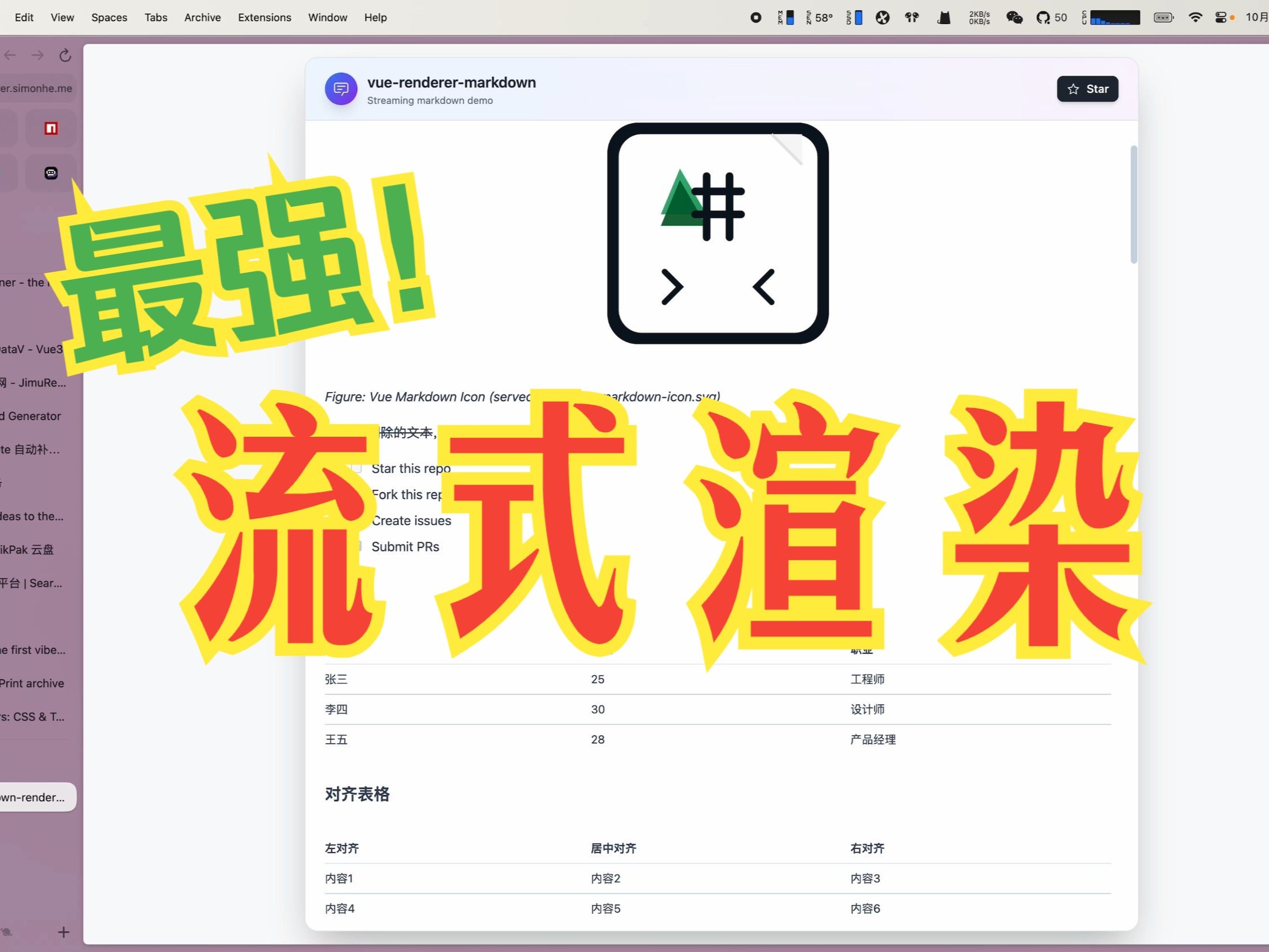](https://www.bilibili.com/video/BV17Z4qzpE9c/)
Watch on Bilibili: [Open in Bilibili](https://www.bilibili.com/video/BV17Z4qzpE9c/)
## Features
- ⚡ Extreme performance: minimal re-rendering and efficient DOM updates for streaming scenarios
- 🌊 Streaming-first: native support for incomplete or frequently updated tokenized Markdown
- 🧠 Monaco streaming updates: high-performance Monaco integration for smooth incremental updates of large code blocks
- 🪄 Progressive Mermaid: charts render instantly when syntax is available, and improve with later updates
- 🧩 Custom components: embed custom Vue components in Markdown content
- 📝 Full Markdown support: tables, formulas, emoji, checkboxes, code blocks, etc.
- 🔄 Real-time updates: supports incremental content without breaking formatting
- 📦 TypeScript-first: complete type definitions and IntelliSense
- 🔌 Zero config: works out of the box in Vue 3 projects
- 🎨 Flexible code block rendering: choose Monaco editor (`CodeBlockNode`) or lightweight Shiki highlighting (`MarkdownCodeBlockNode`)
- 🧰 Parser toolkit: [`stream-markdown-parser`](./packages/markdown-parser) now documents how to reuse the parser in workers/SSE streams and feed `` directly, plus APIs for registering global plugins and custom math helpers.
## 🙌 Contributing & community
- Read the contributor guide: [CONTRIBUTING.md](./CONTRIBUTING.md) and follow the PR template.
- Be kind and follow the [Code of Conduct](./CODE_OF_CONDUCT.md).
- Issues: use templates for bugs/requests; attach a repro from https://markstream-vue.simonhe.me/test when possible.
- Questions? Start a discussion: https://github.com/Simon-He95/markstream-vue/discussions
- Chat live: Discord https://discord.gg/vkzdkjeRCW
- Looking to contribute? Start with [good first issues](https://github.com/Simon-He95/markstream-vue/labels/good%20first%20issue).
- Support guide: [SUPPORT.md](./SUPPORT.md)
- PRs: follow Conventional Commits, add tests for parser/render changes, and include screenshots/GIFs for UI tweaks.
- If the project helps you, consider starring and sharing the repo — it keeps the work sustainable.
- Security: see [SECURITY.md](./SECURITY.md) to report vulnerabilities privately.
### Quick ways to help
- Add repro links/screenshots to existing issues.
- Improve docs/examples (especially streaming + SSR/worker patterns).
- Share playground/test links that showcase performance edge cases.
## Troubleshooting & Common Issues
Troubleshooting has moved into the docs:
https://markstream-vue-docs.simonhe.me/guide/troubleshooting
If you can't find a solution there, open a GitHub issue:
https://github.com/Simon-He95/markstream-vue/issues
### Report an issue quickly
1. Reproduce in the test page and click “generate share link”: https://markstream-vue.simonhe.me/test
2. Open a bug report with the link and a screenshot: https://github.com/Simon-He95/markstream-vue/issues/new?template=bug_report.yml
## Thanks
### Contributors
Thanks to all the people who have contributed to this project!
[](https://github.com/Simon-He95/markstream-vue/graphs/contributors)
### Dependencies
This project uses and benefits from:
- [stream-monaco](https://github.com/Simon-He95/stream-monaco)
- [stream-markdown](https://github.com/Simon-He95/stream-markdown)
- [mermaid](https://mermaid-js.github.io/mermaid)
- [katex](https://katex.org/)
- [shiki](https://github.com/shikijs/shiki)
- [markdown-it-ts](https://github.com/Simon-He95/markdown-it-ts)
Thanks to the authors and contributors of these projects!
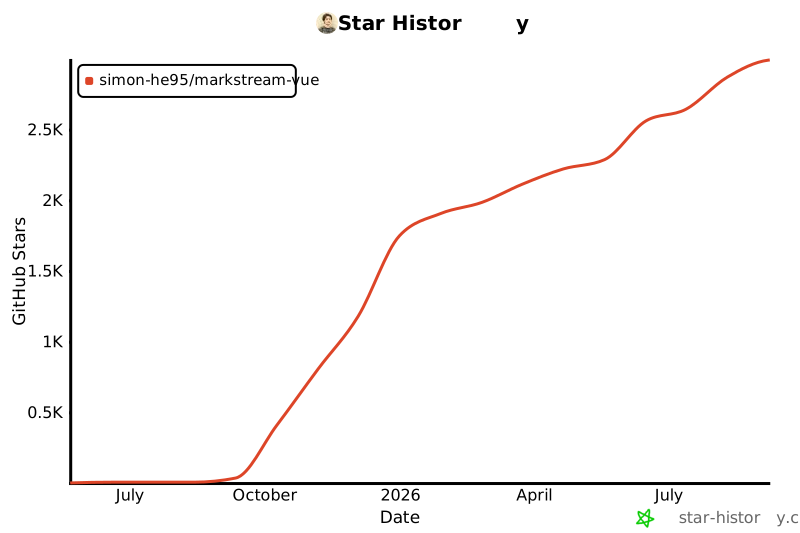
## Star History
[](https://www.star-history.com/#Simon-He95/markstream-vue&Date)
## License
[MIT](./license) © [Simon He](https://github.com/Simon-He95)